How to Schedule Social Media Posts for Addiction Treatment Centers
Consistency is what makes social media work, and almost nobody stays consistent posting live. We cover why scheduling matters, and the choice between native tools and third-party platforms. We cover building a content calendar before you schedule anything, the scheduling process step by step, five tools worth considering for treatment centers, the features to insist on, scheduling across platforms, and why engagement cannot be scheduled.
Consistency is what makes social media work for a treatment center, and almost nobody stays consistent by posting live every day. The answer is scheduling. When you learn to schedule social media posts in advance, a small team can keep a full, professional feed running across every platform without living inside the apps. This chapter walks through how to schedule posts step by step, the best social media scheduling tools for behavioral health, and the compliance safeguards that matter when you are a treatment center rather than a coffee shop. It works alongside the paid campaigns our team runs through social media marketing for treatment centers, because a reliably scheduled feed makes every advertising dollar go further.
Scheduling posts solves the single biggest problem in social media for treatment centers: consistency. A social media scheduling tool lets you plan and queue a week or a month of content in one sitting, so your feed stays active even when your team is busy with admissions. That consistent posting is exactly what the platforms reward with reach, and it is what keeps your center familiar to the families who may need you months from now.
Scheduling also protects quality and compliance. When you draft posts ahead of time, every piece of scheduled content can pass through review before it ever goes live, rather than being written in a rush. For a behavioral health organization, that review step is not optional, and scheduling is what makes it possible. Batching your content creation into one focused session each week is far more efficient than scrambling for something to post every morning, and it frees your marketing team to focus on strategy instead of daily firefighting.
Finally, scheduling gives you control over timing. A social media scheduler lets you publish posts when your target audience is actually online, even if that is an evening or a weekend when no one is at a desk. The result is a stronger social media presence built on a strategic approach rather than luck.
Scheduling posts is also how a lean marketing team punches above its weight. A single social media manager can plan a month of social media content in the time it once took to post for a week, and a small marketing team can keep several social media platforms active without burning out. That efficiency is why social media scheduling has become standard practice for social media marketers everywhere, and why treatment centers that adopt it see steadier audience engagement and faster audience growth than those still posting by hand.
Native Scheduling Versus Third-Party Tools
There are two ways to schedule social media posts: the platforms' own native tools and dedicated third-party scheduling tools. Both have a place.
For native scheduling, Meta Business Suite is the free option most treatment centers start with. From one dashboard you can draft posts, schedule Facebook posts and Instagram posts together, and see a basic content calendar, all at no cost. So yes, you can schedule Instagram posts, as long as you are using a business account connected to a business dashboard rather than a personal profile. Native scheduling is a solid starting point when you only manage one or two social accounts and do not need approval workflows.
Third-party social media scheduling tools go further. A dedicated social media management platform lets you schedule content across multiple social media platforms from one place, manage approval workflows, use a visual content calendar, and pull analytics that native tools do not offer. The difference between native platform schedulers and third-party tools comes down to scale and control: once you are posting across multiple channels, coordinating a marketing team, or routing every post through a compliance reviewer, a third-party social media scheduler pays for itself quickly.
Build a Content Calendar Before You Schedule
Scheduling posts works best when it sits on top of a plan. Before you touch a scheduling tool, build a content calendar that maps your social media strategy to specific days.
A content calendar, sometimes called a social media calendar or marketing calendar, is simply a view of what you will publish and when. It turns a vague social strategy into a concrete list of scheduled content. Start by defining a few content pillars, the core themes your center posts about, then block those recurring themes across the week and slot specific post ideas into each day. Keep your whole content creation process anchored to this calendar, so writing captions and preparing visuals becomes a focused batch rather than a daily scramble. When your marketing teams can see the full month at a glance, gaps disappear and your social media campaigns stay coordinated across every platform.
The calendar is also where collaboration happens. Good collaboration tools and team approval workflows let a writer, a designer, and a compliance reviewer all work from the same content calendar, so scheduling posts becomes the last easy step rather than a bottleneck. Once the calendar is approved, loading it into a social media post scheduler is quick, and the whole month of scheduling posts can be handled in a single sitting.
How to Schedule Posts Step by Step
Whatever tool you choose, the workflow for scheduling posts follows the same pattern. Here is how to schedule posts from a blank calendar to a full queue.
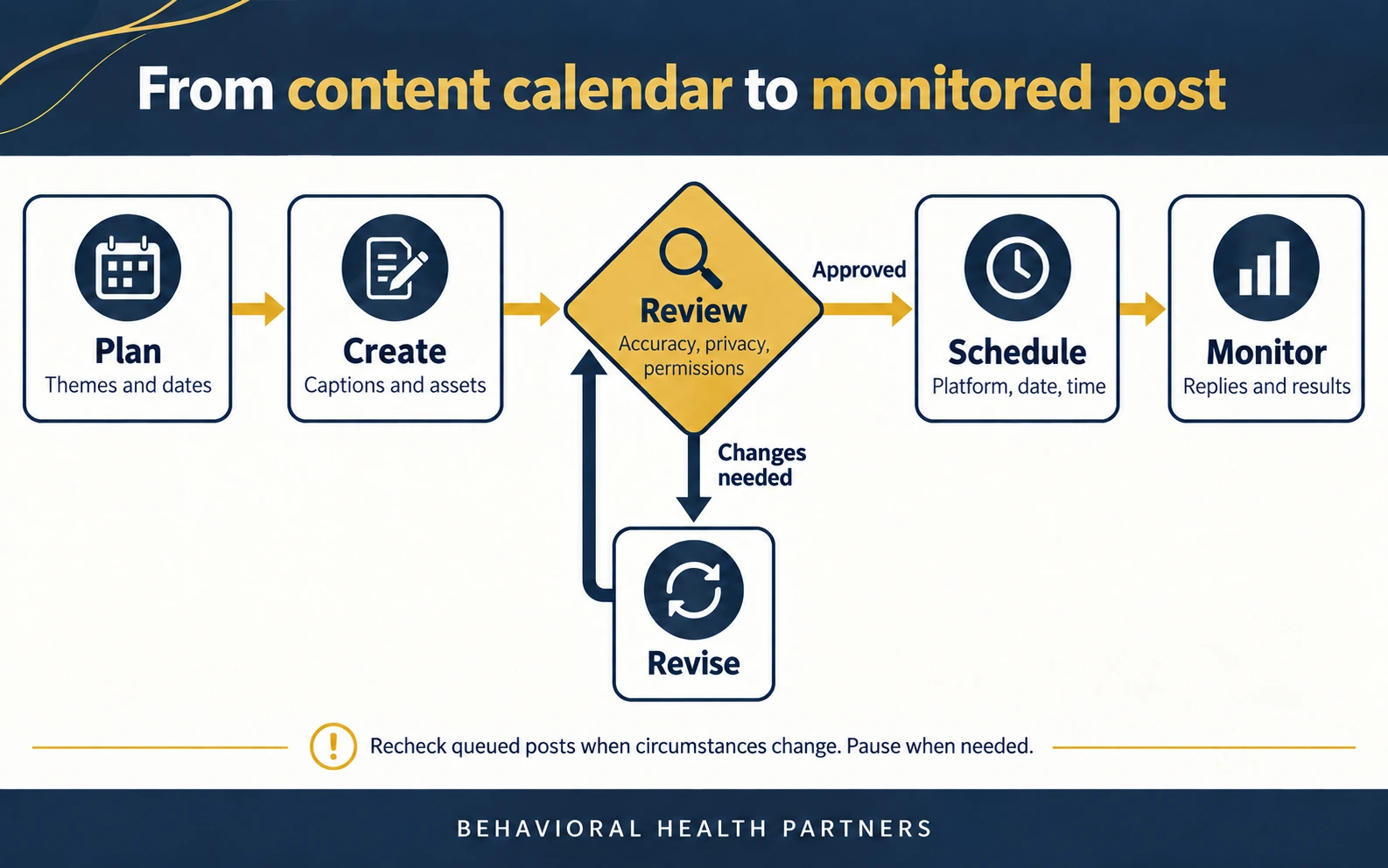
Start by building your content calendar. Map out the week or month by theme, so you know what you are publishing and when before you write a single caption. A visual calendar makes gaps and clumps obvious at a glance. Next, batch your content creation. Draft posts for the whole period in one focused session, writing captions, choosing creative assets, and preparing any images or short videos together rather than one at a time.
Then route everything through your approval workflow. In a treatment center, a compliance reviewer or clinical lead should approve every post before it is scheduled, checking that nothing identifies a client and that no protected health information appears. Once approved, load the posts into your social media scheduler, assign each one a date and time, and use bulk scheduling to publish content across multiple social channels in just a few clicks. Finally, review your basic analytics after posts go live, see what performed, and feed that insight back into the next round of scheduled content. This publishing workflow, repeated weekly, keeps your feed full and your team on the same page.
The 5 Best Social Media Scheduling Tools for Treatment Centers
There are dozens of social media management tools, but a treatment center needs a specific mix: solid approval workflows, a clear visual calendar, support for multiple social channels, and a price that fits a lean marketing budget. These five social media scheduling tools consistently deliver that mix. Choose based on your team size and how much your publishing workflow depends on approval.
Buffer is the best beginner-friendly scheduling tool for small teams. It offers a clean interface, a genuinely useful free plan, straightforward bulk scheduling, and simple analytics, which makes it a strong first step up from native scheduling. Buffer's free plan supports scheduling posts to several social accounts, so a small treatment center can build a consistent posting habit before paying for anything. As your marketing team grows, its paid tiers add a proper content calendar, more social channels, and light approval workflows. For a center whose social media manager wants to schedule posts quickly without a learning curve, Buffer is the easiest place to start.
Hootsuite is the best social media scheduling tool for bulk scheduling across multiple profiles. It handles many social accounts at once, with a unified inbox, social listening, sentiment analysis, and advanced reporting that suit a larger marketing team managing multiple platforms simultaneously. Hootsuite's strength is breadth: you can schedule content, monitor social media interactions, run social listening, and pull advanced analytics from one dashboard. It is more than a small center needs, but for a growing organization or a marketing team juggling multiple clients, its all-in-one publishing workflow earns its price.
Later is the best social media scheduler for visual scheduling. Its drag-and-drop visual content calendar makes planning an Instagram-heavy feed simple, and it supports scheduling to the other major platforms too. Later leans into visual planning, letting you see exactly how your grid will look before you publish content, which suits centers that post a lot of imagery and short video. A generous free plan and an easy visual calendar make it a favorite for teams that think in pictures rather than spreadsheets.
Sprout Social is the premium, end-to-end social media management platform. It combines scheduling, a unified inbox, sentiment analysis, deeper analytics, social listening, and team collaboration in one place, which fits organizations that want everything in a single suite. Sprout is the priciest option here, but for a marketing team that wants deep reporting, inbox management, and custom approval workflows without stitching several tools together, it is the most complete social media management platform on this list.
Planable is the standout social media scheduling tool for content reviews and approval workflows. It lets your team draft posts, leave feedback, and manage every review with custom approval steps before anything publishes. Planable was built around collaboration and approval rather than added on later, so a compliance reviewer can approve or request changes on every post inside the same visual calendar the team plans in. For a behavioral health organization where every post must be reviewed, Planable's approval-first design is often the deciding factor, and it is also a favorite of agencies managing multiple client accounts for the same reason.
Social Media Scheduling Tools at a Glance
If you want the short version: start with Buffer if you are a small team on a budget, choose Later if your feed is visual and Instagram-first, pick Hootsuite if you need bulk scheduling and social listening across many social channels, invest in Sprout Social if you want one premium suite for everything, and select Planable if approval workflows are your top priority. Several of these also handle multiple brands and multiple accounts under one login, which matters if your organization runs more than one facility.
How to Choose a Scheduler That Scales With Your Team
The best social media scheduling tool is the one your team will actually use, so match the tool to how you work rather than to a feature list. A solo social media marketer at a single facility rarely needs an enterprise suite; a free plan plus native scheduling may be plenty. A small marketing team posting across multiple social channels will want a shared content calendar, bulk scheduling, and a basic approval process. A larger organization coordinating multiple clients and multiple brands needs advanced features: custom review steps, advanced analytics and advanced reporting, social listening, and role-based team collaboration. Weigh the free plan, the approval workflows, the supported platforms, and the learning curve against how many social media platforms you truly need to cover, and remember that a tool nobody adopts is worse than a simple one everybody uses.
Must-Have Features in a Social Media Scheduling Tool
Beyond the brand names, focus on the features that matter for a treatment center. The right social media scheduling tool should make consistent, compliant posting effortless.
Look for approval workflows, ideally custom approval workflows that let a compliance reviewer sign off before anything publishes, since this is the single most important feature for behavioral health. A visual content calendar helps you see your whole month and organize posts at a glance. Bulk scheduling and import save hours by letting you upload and schedule content in batches, often by importing many posts at once from a CSV file, which is invaluable when you manage a high volume of scheduled content each week. A unified inbox pulls messages and comments from multiple networks into one place so nothing goes unanswered. Team collaboration and clear roles keep everyone on the same page. Basic analytics, or advanced analytics on higher tiers, show you what works, and many tools now connect to Google Analytics so you can tie social posts to website traffic, which pairs well with a broader approach to analytics for behavioral healthcare. Some tools add social listening, sentiment analysis, and AI content tools, which are helpful but secondary to the core publishing workflow. Many schedulers now include AI features that suggest the best time to post based on when your audience is active and help draft or repurpose captions, and most offer a mobile app so a compliance reviewer can approve scheduled content on the go. Look for evergreen content features too, which let you re-queue your best high-performing posts automatically so strong material keeps working for months.
Do not overpay for advanced features you will not use. A small treatment center is often better served by a simple tool with a strong free plan than by an enterprise suite built for agencies juggling multiple brands.
Schedule Across Every Platform
One of the biggest advantages of a social media scheduling tool is publishing to every network from one place. Instead of logging into each app, you draft once and schedule content to multiple platforms simultaneously.
You can schedule Instagram posts, Facebook posts, and content for the other major platforms from a single dashboard, adapting the caption and format for each network as you go. Most social media scheduling tools also let you schedule to your Google Business Profile, which is valuable for a local treatment center, since a steady stream of posts on your Google Business Profile supports local visibility alongside your social feed. When you schedule posts across multiple networks at once, you keep a consistent voice across every channel while cutting the time it takes to publish posts to a fraction of what manual posting requires. Scheduling also lets you reach audiences in different time zones automatically, so a post lands at the right local hour without anyone staying up to publish it.
Before you commit to a tool, confirm its supported platforms match where your audience actually is. A treatment center rarely needs every network, but the scheduler you choose should cover the two or three social media platforms where your families spend time, and ideally your Google Business Profile as well. Once those are connected, scheduling posts across all of them becomes a single weekly task rather than a daily grind.
Engagement Does Not Stop at Scheduling
Scheduling handles publishing, but social media is still a conversation. The best social media management tools pair scheduling with a unified inbox so your team can manage engagement in one place.
A unified inbox pulls comments and messages from multiple networks into a single view, which turns inbox management from a scramble into a routine. Some tools add social listening and sentiment analysis so you can track how people talk about your center and the wider recovery conversation. Reply promptly and warmly, never confirming that anyone is or was a client, and treat every social media interaction as a chance to build trust. Scheduled content keeps your feed alive, but real audience engagement is what turns followers into audience growth and, eventually, admissions. Our chapter on how to get Facebook followers for drug rehab centers covers how consistent, scheduled posting feeds that growth over time.
Posting Frameworks and the Best Time to Post
Scheduling is only as good as the plan behind it. A few simple frameworks keep your scheduled content balanced rather than salesy.
The 5-3-2 rule suggests that out of every ten posts, five share others' relevant content, three share your own content, and two are personal or human posts that show your center's heart. The related 50/30/20 rule allocates fifty percent of posts to educational or valuable content, thirty percent to shared content, and twenty percent to promotion. The 4-1-1 rule keeps the same spirit: four helpful posts and one soft update for every promotional post. The exact ratio matters less than the habit of keeping most of your social media content useful rather than promotional.
As for timing, schedule posts for when your target audience is active, which for treatment centers often means evenings and weekends when families have time to think and search. Analyze your platform analytics to identify the peak hours when your audience is most active, since posting during those windows increases engagement. Use your scheduler's best-time-to-post suggestions as a starting point, then let your own analytics refine it, and adjust your posting frequency to match how each network's audience behaves. And to answer a common worry: no, scheduled posts do not get fewer views. The platforms treat a scheduled post exactly like a live one, so scheduling costs you nothing in reach while saving you hours.
Common Scheduling Mistakes to Avoid
Scheduling posts is simple, but a few habits separate a smooth social media management routine from a messy one. Avoid these and your scheduled content will do its job.
Do not set it and forget it. Scheduling posts frees your time, but you still have to monitor the account, reply to comments, and pause scheduled content when real-world news makes a lighthearted post feel wrong. Do not schedule identical posts to every network; adapt each one, because what works on one platform falls flat on another. Do not overload the calendar either, since a wall of scheduled posts with no engagement reads as automated. The best social media marketers schedule a steady rhythm and leave room to react in real time.
Do not skip the review step to save time, and do not let scheduling posts drift away from your social media strategy. Every batch should still map to your marketing calendar and your goals. If several people or several facilities are involved, keep everyone working from one content calendar with clear roles, so your marketing teams are not scheduling posts on top of each other across multiple accounts. A little discipline in your content creation process keeps a scheduling system from turning into autopilot noise, and it keeps your social posts feeling human even when they were planned weeks ahead.
Keep Every Scheduled Post Compliant
For a treatment center, the reason to schedule is not only efficiency, it is control. Scheduling with an approval workflow is what lets a compliance reviewer catch a problem before it is ever public.
Every scheduled post should be reviewed to confirm it never identifies a client and never contains protected health information without authorization. According to HHS, the HIPAA Privacy Rule allows a covered entity to use or disclose protected health information for marketing only with the individual's written authorization, so a story, photo, or testimonial cannot be scheduled until that consent is documented. The federal rule at 45 CFR 164.508 spells out what a valid authorization must contain and requires you to keep the signed form on file, so build consent collection and record-keeping into your workflow before anything reaches the schedule. This is exactly why approval workflows matter so much for behavioral health: the tool becomes a compliance checkpoint, not just a calendar. Build the review step into your publishing workflow, give your compliance reviewer the final say, and when a post is in doubt, hold it rather than schedule it.
Compliance and consistency are not in conflict. Scheduling posts through a system with a real approval workflow lets you post often and post safely at the same time, which is exactly what a growing treatment center needs. Done right, scheduling posts is not a shortcut around review, it is what makes thorough review possible at scale.
Put Your Scheduling System to Work
A calendar, a tool, and an approval workflow turn scattered posting into a dependable social media presence. Once your system is running, staying consistent takes a fraction of the time, and consistency is what builds the audience that eventually becomes admissions.
If you want a partner to build and run that system for you, our team pairs organic scheduling and content with compliant paid social. Request a strategy conversation through our rehab marketing team and put your social media calendar on autopilot.
Frequently Asked Questions
Can you schedule Instagram posts?
Yes. You can schedule Instagram posts for free using the native Meta scheduler, as long as your account is a business or creator account connected to a Facebook page rather than a personal profile. You can also schedule Instagram posts through third-party social media scheduling tools like Buffer, Later, or Hootsuite, which add a visual calendar, approval workflows, and analytics. If you cannot schedule a post on Instagram, it is almost always because the account is still a personal profile or is not properly connected to a Facebook page and business dashboard.
What is the best free tool for scheduling social media posts?
For most treatment centers, Meta Business Suite is the best free option for scheduling Facebook posts and Instagram posts, since it is native, reliable, and costs nothing. Among third-party social media scheduling tools, Buffer offers one of the strongest free plans for a small team, covering the core scheduling and simple analytics you need. Start free, and upgrade only when you need approval workflows, more social accounts, or advanced analytics.
Do scheduled social media posts get fewer views?
No. This is a common myth. Facebook, Instagram, and the other major platforms treat a scheduled post exactly the same as one you publish manually, so scheduling has no negative effect on reach. What actually drives views is consistent posting, strong content, and timing, all of which a social media scheduler makes easier rather than harder.
What is the 5-3-2 rule for social media posts?
The 5-3-2 rule is a simple mix for a balanced feed: for every ten posts, five share valuable content from others, three share your own content, and two are personal or human posts that show your center's personality. Like the 4-1-1 and 50/30/20 rules, it exists to keep most of your social media content genuinely useful to your audience rather than promotional, which is what builds trust over time.
How do I schedule posts across multiple social media platforms at once?
Use a third-party social media scheduling tool that supports the platforms you use. Draft your post once, adapt the caption and format for each network, then use bulk scheduling to publish content across multiple social channels from a single dashboard in just a few clicks. Tools like Hootsuite, Buffer, and Sprout Social are built for this kind of multi-platform scheduling, which saves a marketing team hours every week.
Adam Vibe GuntonFounder and Managing Partner, Behavioral Health Partners
Adam Vibe Gunton is an addiction recovery expert, entrepreneur, marketer, brand strategist, and speaker dedicated to advancing the behavioral health industry. As Founder and Managing Partner of Behavioral Health Partners, he has worked across treatment-center development, operations, branding, PR, SEO, advertising, and growth strategy. Combining professional experience with his own lived experience in recovery, Adam brings a unique perspective on how treatment organizations can build trusted brands, reach more people, and create a greater impact.
Thirty minutes on video with Adam directly, camera on, screen-sharing your own online presence and your top three local competitors. If we are not the right partner, we will tell you that too.